Now in open beta · Android

Set it. Trust it. Be Out On Time!

Set your deadline and put your phone down. OutOnTime works backwards, paces every step, and comes to get you when it's time — so you're out the door, calm, every time.

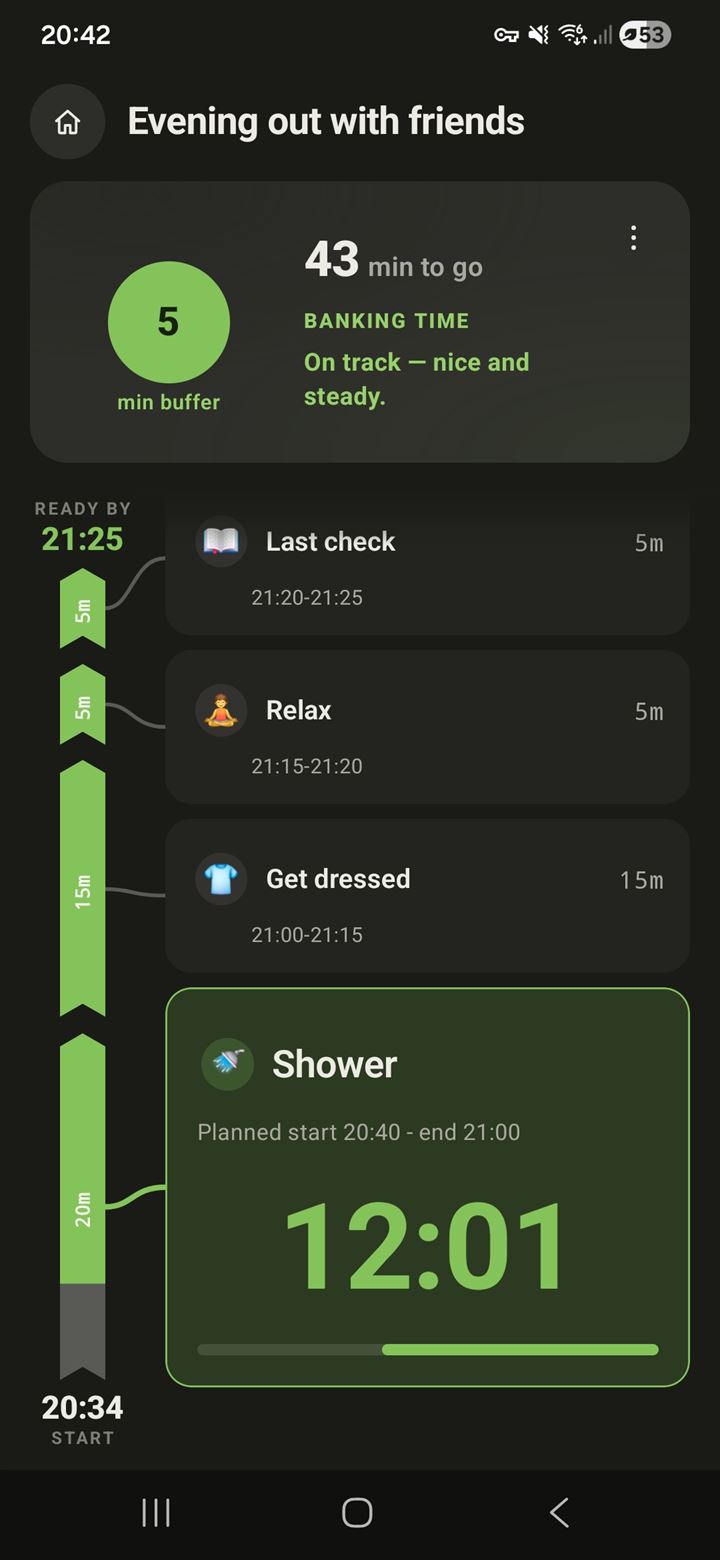
OutOnTime live run screen — 43 minutes to go, a 5-minute buffer, on track, with the timeline rail filling as the current step counts down

A real run in the beta — not a mockup.

Be one of the first. Join the open beta and help shape OutOnTime.

The 7:42 feeling

You already do the math.
Every single morning.

That silent calculation has a name in psychology: the planning fallacy — the well-documented bias that makes nearly everyone underestimate how long things take, even against years of their own evidence. And running the numbers in your head costs attention you'd rather spend on your actual morning. Willpower doesn't fix either one. Honest, externalized time does.

"Shower, lunchboxes, where are the keys… will we actually make it?"

Straight from the app

One evening, three moments.
This is what staying with you looks like.

Real screenshots from a single run — getting ready for an evening out with friends.
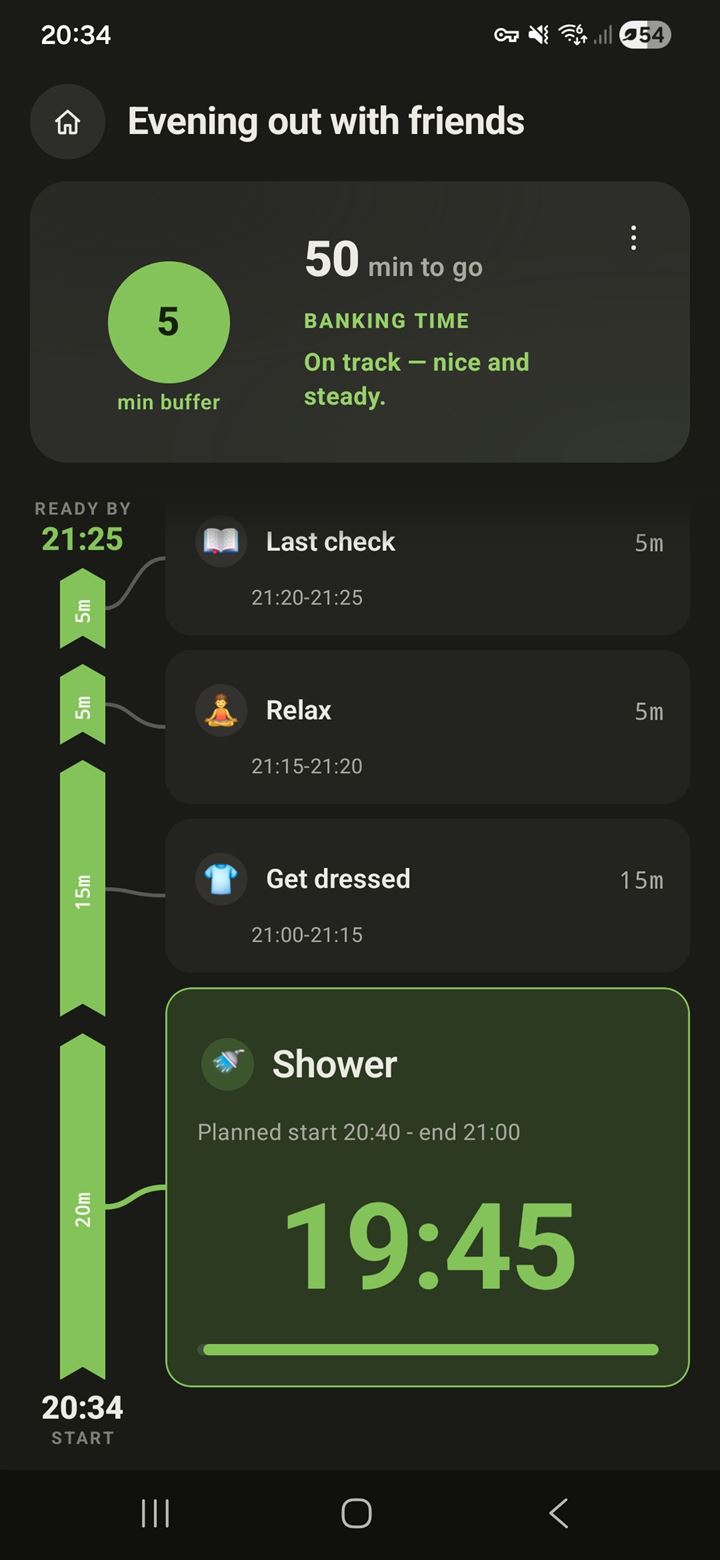
OutOnTime run screen, on track: 50 minutes to go, a 5-minute buffer, and a paced timeline of steps — Shower in progress, then Get dressed, Relax and Last check
20:34 · On track

One honest number

Your buffer, front and center: five spare minutes, live — computed from what's actually left to do, not from a best-case guess. The timeline paces every step, so you always know what's now and what's next.
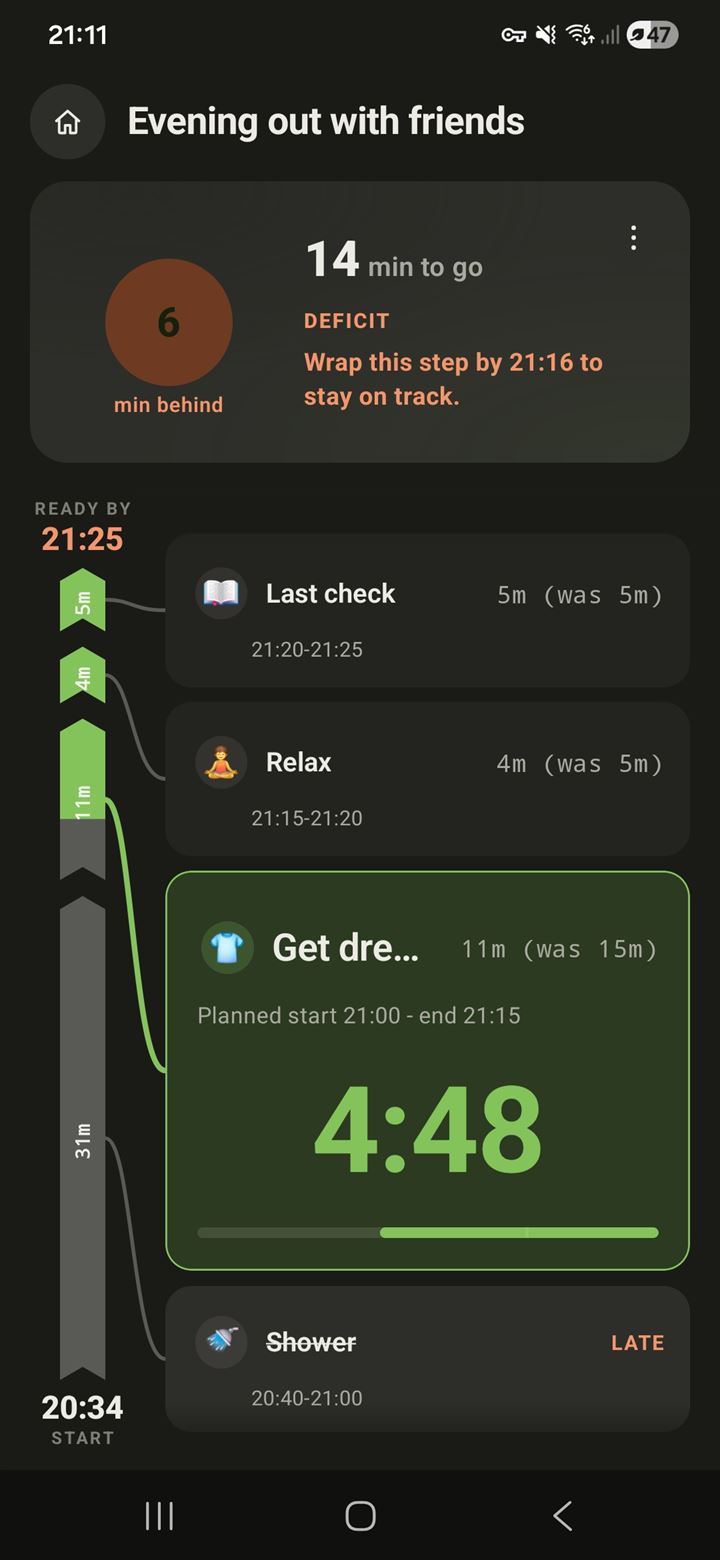
OutOnTime run screen, adapting: the Shower step finished late, the plan shows 6 minutes behind, the next steps re-paced from 15 to 11 and from 5 to 4 minutes, with the instruction to wrap the current step by 21:16 to stay on track
21:11 · Adapting

Life happens. The plan absorbs it.

The shower ran late, so the remaining steps quietly re-paced themselves — 15 minutes became 11, 5 became 4 — and the plan tells you the one thing that matters: wrap this step by 21:16. A concrete if-then instruction, delivered at the exact moment it applies.
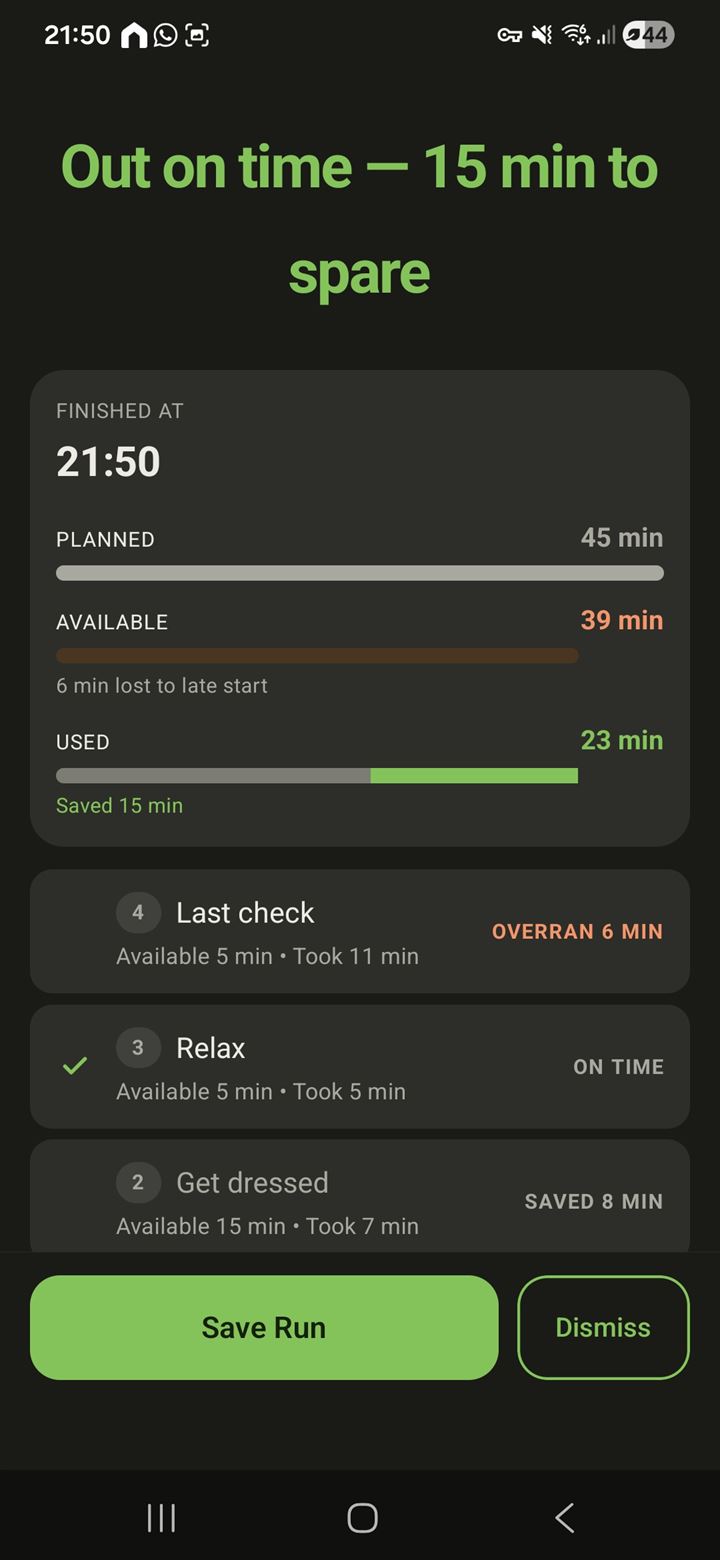
OutOnTime run summary: Out on time with 15 minutes to spare — planned, available and used time compared, and each step marked as saved time, on time or overran
21:50 · Out on time

The honest debrief

Every run ends with a truthful account of where the time went, step by step. Feed those real durations back into the routine and it drifts toward reality — the one fix research shows works. Week by week: fewer close calls, less rush, less stress.

How it works

Three steps to a calmer departure

No mental math. No nagging. Just follow along.

01

Set your deadline

Tell OutOnTime when you need to be out. It works backwards and schedules every step for you.

02

Follow the steps

When it's time, it comes to get you — one step at a time, perfectly paced. Just do the thing in front of you.

03

Be Out On Time

See you're on track at a glance. Out the door without the stress — calm, reliable, every time.

It keeps watch, so you don't have to

Look up. We'll keep time.

You don't need to check your screen all the time. OutOnTime keeps you posted as time progresses — right on your wrist, too — so your attention stays where it belongs.

  • A gentle nudge when it's time to wrap a step and move to the next
  • A quiet heads-up if you start running late
  • Right on your watch — glance, don't dig for your phone
⏱️
OutOnTime
Time to wrap up Shower
Up next: Breakfast · 15 min
now
OutOnTime
You're on track
7 minutes of breathing room. Nicely done.
2m
⚠️
OutOnTime
Running a little behind
I'll re-pace the rest to keep you on time.
5m
2 min left · Shower
…and the same gentle pacing, right on your wrist.
What's inside

Four ideas from the research, built as a product

🧭

Backward planning

You give it one fixed fact — when you need to be out — and it plans in reverse from there. Planning backwards from a deadline is the direction shown to produce realistic estimates, because it surfaces the obstacles forward planning glosses over.

🔔

The handoff

The app watches the clock so you don't have to: an alarm-style nudge to start, then step-by-step cues on your phone and watch. Times become events — the kind of intention brains actually keep.

📊

An honest feedback loop

One live buffer number during the run, a truthful debrief after. Your routine converges on your real durations — confronting past times is the documented fix for chronic underestimating.

🔒

Local-first

No account, no ads, works offline, your data never leaves your phone. And when you slip, it coaches instead of punishing — time perception is a skill to support, not a character flaw to correct.

Not just mornings

Calmer routines, all day long

The same gentle engine powers a one-off departure and the routine you repeat without thinking. A Flow is a Flow — some run once, some repeat.

🛫 Catching a flight🎒 The school run🩺 Appointments 🎭 Concerts & events🌅 Weekday mornings🌙 Wind-down routines
Questions

Frequently asked

What is OutOnTime?
OutOnTime turns a deadline into a calm, paced, step-by-step routine. You set when you need to be out, it works backwards to schedule each step, then guides you live and shows whether you're still on track.
How is it different from a reminder app or a "when to leave" calculator?
Calculators tell you when to start, then leave you on your own. OutOnTime stays with you through every step — showing your real buffer minute by minute, telling you exactly how to catch up when a step runs over, and ending each run with an honest debrief so it learns your patterns over time.
Do I need to create an account?
No. OutOnTime is local-first — no account, no sign-up. It works offline and your data stays on your phone.
Will it notify me, even on my watch?
Yes. It nudges you when it's time to start, when to finish a step and move to the next, and if you start running late — on your phone and your watch — so you don't have to keep checking the screen.
Is OutOnTime only for mornings?
Not at all. The same engine powers one-off departures (a flight, an appointment) and recurring routines (weekday mornings, the school run, wind-down). A Flow is a Flow — some run once, some repeat.
Is OutOnTime only for people with ADHD?
No. It's built on time-perception and planning research that applies to almost everyone — the planning fallacy is universal. That said, if you experience time blindness, which is common with ADHD, the design leans directly on that research: external cues instead of clock-watching, time made visible, and no punishment mechanics. OutOnTime is a planning tool, not a medical treatment.
How much does it cost?
OutOnTime is free to use, and it shows no ads — and it never will. It's built to earn its place by being genuinely useful, not by selling your attention or your data.
How do I join the beta?
OutOnTime is in open testing on Google Play. Open the Google Play listing, tap Join the beta, then install. Android for now.
Join the beta

Set it. Trust it. Be Out On Time!

OutOnTime is now in open beta on Google Play — install it in a couple of taps. Free, no ads, Android for now.